When you onboard with Klear, we create a dedicated, FDIC-insured account at Fifth Third Bank
in your name. This account serves two purposes:
1. It’s where Klear deposits funds when your trades are approved
2. It’s where your customers remit invoice payments directly
3. Using this account automatically digitizes your transactions, saving your team time and
creating visibility
💡 Pro Tier customers only: Any idle cash held in your Klear account earns cashback, so your
capital works harder for you.
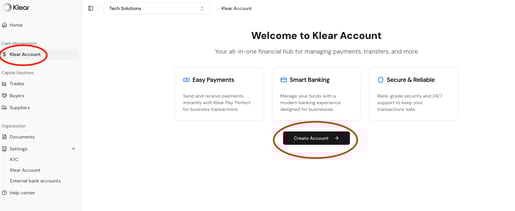
Open Your Klear Account
● Go to Cash Management > Klear Account
● Click Create Account
● Your unique Klear account details will populate here, you may need to refresh the screen
How to Send a Test Payment
To ensure your payment setup is complete, we recommend sending a test payment from your
Klear account to your external bank account.
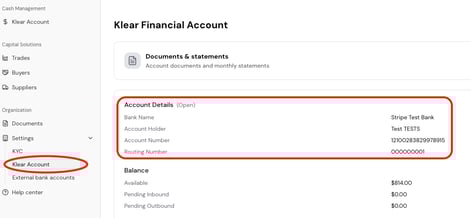
Send Funds Into Your Klear Account
Before you can send a test payment, your Klear account must be funded.
To do this:
● Initiate a wire or ACH transfer from your external bank account to your Klear account
● Use the account details found under Settings > Klear Account
● A small amount (e.g., $5–10) is sufficient for test purposes
Send a Test Payment
Once funds arrive in your Klear account:
● Go to Cash Management > Klear Account > Transfer

● Choose your Klear account as the source
● Select your external bank account as the destination
● Enter a small test amount and confirm the transfer
Confirm Receipt
● Check your external bank account to verify the funds arrive