Linking your external bank account ensures:
● Real-time visibility across balances
● The ability to move funds quickly, without delays or added transfer fees
● A complete view of your liquidity and greater control over your working capital
Once linked, you can transfer funds seamlessly between your Klear account and your external
accounts.
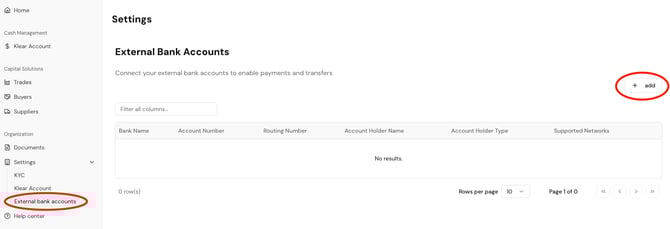
1. Log in and go to Settings > External bank accounts.
2. Click + add
3. When prompted, select “Wire” as well as “ACH” as the transfer method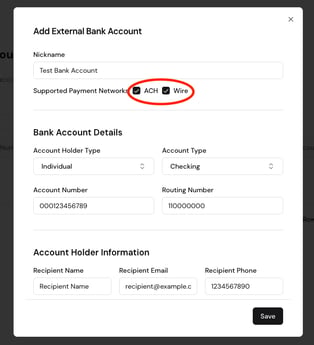
4. Enter the following details:
○ Bank name
○ Account Holder type
○ Account Type
○ Account number
○ Routing/ABA number
○ Account holder information (must match your company name)
○ Bank address - this is required for wire transfers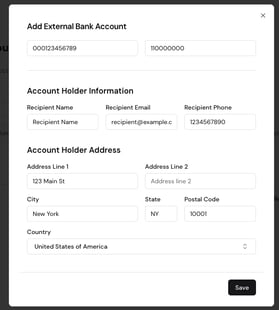
⚠️ If no address is provided, outbound wire transfers will fail
5. Click Save
6. Click on the three dot menu "..." to the right of the External Bank Account.
7. Click Initiate Verification. This will send a micro-deposit of $0.01 to your bank account with a code.
8. When the deposit hits, come back to this screen, click the three dot menu again and click Verify. Enter the code. Your connected external bank account will be verified.