How to Bulk Upload Customers
In your left-hand navigation menu, select Customers.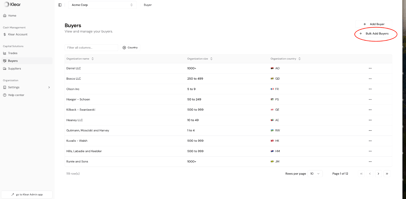
Click + Bulk Add Customers in the top right corner.
This opens the bulk upload window.
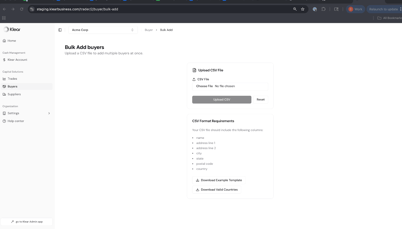 Click Download Example Template to get the correct CSV format.
You can also download a list of Valid Countries to ensure correct country codes.
Fill Out the CSV Template
Each row should include:
- name — Legal company name
- address line 1
- address line 2 (optional)
- city
- state
- postal code
- country (must match a valid country code from the download)
Upload Your File
- Once your CSV is ready, click Choose File and upload it.
- Then select Upload CSV.
- If needed, use Reset to clear the upload and start over.
Validate & Confirm
- The system will automatically check for formatting or missing information.
- If errors appear, hover over the message to see which row needs fixing.
- Re-upload your corrected file once complete.
Once uploaded successfully, your Customers will appear in your Customers list within the platform.
Note, the same can be done for Suppliers in the Suppliers tab.